
Updating Your Email Address in CAIA
This is for non-Treasury users who use PIV, PIV-I, or CAC for authentication. Those using other Credential Service Providers, or CSPs, such as ID.me, will update their email through the CSP.
-
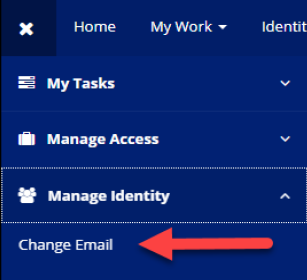
Sign into IdentityIQ using your PIV, PIV-I, or CAC credentials. From the menu at the top left, click the drop down for Manage Identity, then select Change Email.
-
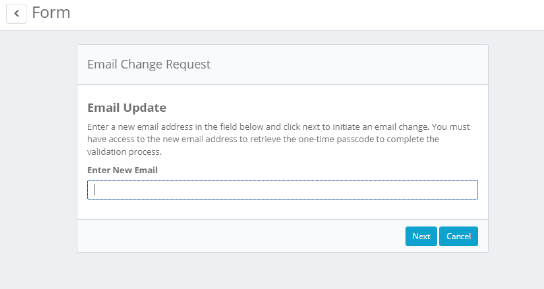
Review the email address shown. If you want to update the email address in Common Approach to Identity Assurance (CAIA), enter the new email address in the text box and click Next. You must have access to this email address to complete the validation process.
Note: This email address must be the email address used for all Treasury applications using CAIA.
-
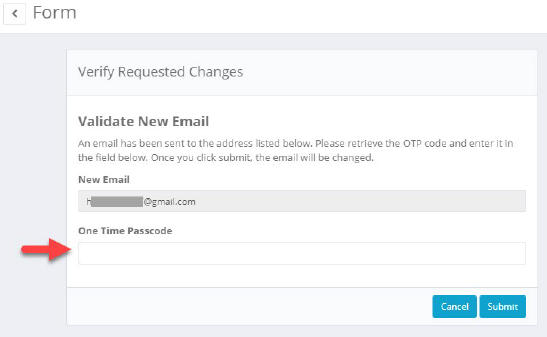
Do not close this screen. The form will ask that a one time passcode, or OTP code, be provided. This OTP code will be sent to the new email address. Enter the OTP code and click Submit.
For security purposes, the old email address will receive a notification that the email address on record for your identity is being changed.
-
Once submitted, the home screen of IdentityIQ will be displayed with a successful email change banner at the top. The new email address will receive a second email stating that it has been successfully updated. This will now be the email on record for the identity.


Support Options
Before you Contact Us
Check our FAQ for quick answers.
Review relevant user guides and tutorials.
Have your vendor ID and specific questions ready.

Contact Information
Phone Support
Call during operating hours for immediate assistance.