
Non PIV MFA Quick Reference Guide
Multifactor Authentication
Multifactor Authentication (MFA) is required to login to IPP. MFA strengthens account security by requiring two factors to confirm user identity. These factors usually include:
- Something you know - A username and password, for example, plus
- Something you own - Like a smartphone, tablet, mobile app, or a security key
IPP is partnering with a third-party credential service provider (CSP), ID.me, to enable MFA. All agency users, without a PIV or CAC card, will have to create a new or use an existing ID.me account.

IPP Login Page
Creating an ID.Me Account
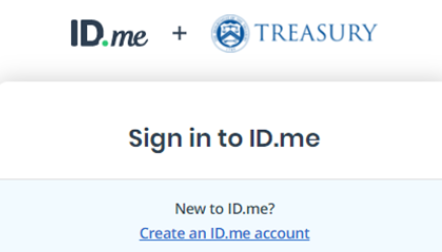
Click “ID.me” on the IPP login page. This will send you to the ID.me login page. If you do not have an existing ID.me account and would like to create one, then review the requirements and steps to create an account before you click “Create an ID.me account” on the ID.me login page. You must enter the Treasury ID.me login page from the IPP login page.
Note: If an existing ID.me account will be used, users must ensure that their IPP account email address is added to the account as the primary email address.
Frequently Asked Questions
Nothing will happen to the information stored in your IPP account. You will keep all your data and still be able to accomplish everything you can do today.
Once you set up an ID.me account, we’ll link it back to your IPP account. You will continue to visit IPP.gov to access your account. The only difference is you will use your ID.me email address, password, and a one-time security code to sign into IPP.
Users are required to enroll in ID.me with a one-time submission of unique identifiers and photo/ video proof for identity verification and authentication. You will need:
- Email Address
- Photo identification: Driver’s license, State ID, Passport, or Passport Card
- A computer or cell phone with access to the internet and a front-facing camera
- Full legal name
For assistance with creating an ID.me account please review the requirements and steps in Creating your ID.me account (opens in a new tab).
Use your IPP account email address, so we can automatically link your IPP account to your ID.me account. If you use a different email address, we will not be able to link your account.
This process only works if the ID.me email address in the sign-in process is the same as your IPP account email address.
For ID.me, the primary email address in your existing ID.me account must match the email address in your IPP account. Please follow the instructions in “Changing your primary email address” to update the primary email address in your ID.me account.
ID.me Help Center
For assistance with creating or maintaining your ID.me account, please access the ID.me Help Center.

Support Options
Before you Contact Us
Check our FAQ for quick answers.
Review relevant user guides and tutorials.
Have your vendor ID and specific questions ready.

Contact Information
Phone Support
Call during operating hours for immediate assistance.